
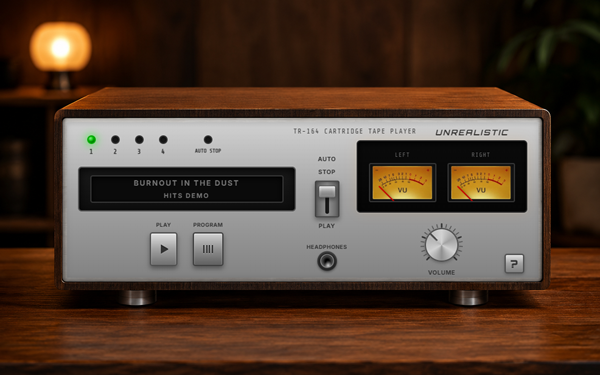
Interactive 8-Track Media Player: Retro Engineering for the Modern Web
This project is a custom-built interactive audio plugin developed for the official website of the upcoming PC game “Burnout in the Dust”. It serves as a tactile, immersive “first listen” to the game’s original soundtrack, bridging the gap between digital UI and 1970s hardware aesthetics.
The Creative Vision
In-game atmosphere is paramount. To reflect the lore and era-specific design of the game, we built a player that functions as a physical object. The goal was to move beyond the standard “play/pause” button and create a “hardware” experience that invites users to interact with mechanical responses.
Technical Highlights
- Web Audio API: Real-time channel splitting drives independent Left/Right analog VU meters with real-time audio data.
- Needle Physics: Custom JavaScript logic simulates mechanical inertia (Fast Attack / Slow Decay) for authentic movement.
- Authentic Logic: Modeled “Program” switching and “Auto-Stop” behavior that mirrors genuine vintage 8-track decks.
Project Status
The player is currently being integrated into the game’s primary hub. While the official website is in active development and not yet public, this component stands as a core example of our ability to build high-performance, immersive web tools from scratch.
Visit Official Game Site (Coming Soon)
We’ve embedded the fully functional 8-Track Player directly on this page so you can experience it firsthand. Click the buttons, switch tracks, and hear the sample audio from Burnout in the Dust, exactly as it was built for the game’s supporting website. Every interaction is live; this is the real component, not a video or mockup.
Ready to Upgrade Your Online Presence?
Stop letting slow page speeds and outdated templates hold your business back. Let’s build a digital platform engineered for lasting growth.